Fluids, cloth, soft bodies, sand and snow in one unified particle solver, natively inside Blender — now with the MPM Multi-Material solver, Granular materials that clump and break into chunks, open ocean in a Water Tank and the tearing Glue constraint.
Overview
One Solver, Every Material
Hurricane is now a professional, top-tier simulation tool: it handles millions of particles with remarkable detail, ready for any kind of production — from product shots and commercials to film and series VFX.
It is a particle simulation engine built into Blender. Its unified architecture lets fluids, cloth, soft bodies and granular materials live in the same simulation and push on each other — water soaking a cloth, sand burying a soft body, viscous honey folding over a rigid shape.
The solver runs as a separate process — multi-core on the CPU or natively on the GPU (Vulkan on Windows and Linux, Metal on Mac) — and streams every frame back to Blender, so the viewport stays responsive while it works. Particles are drawn with their own GPU shaders, meshes are generated with Geometry Nodes, and the whole simulation is cached to USD on disk, ready to play, render, retime or move to another machine.
Unified Multi-SolverDDR for fluids, PBD and multi-step PBD for cloth, soft bodies and sand — mixed freely in one scene.
MPM Multi-MaterialLiquids, snow, sand, mud, jelly, clay and pastes interacting in one simulation, with 47 one-click material presets.
FLIP & APICGrid liquid solvers for large-scale water, with Thin Film, physical viscosity, solver presets and open ocean in a Water Tank.
GPU SolverThe simulation runs on the graphics card, with the liquid mesh built by the solver as it simulates.
GranularGrains that grip, clump and break into chunks, with presets from dry sand and soil to snow and gravel.
Seven Constraint TypesCloth, Softbody, Rigidbody, Viscous, Plasticity, Weld and the new Glue, with tearing and breaking.
Mapping LayersAny particle or link setting can change with age, speed, height, temperature, noise, distance and more.
TriggersParticles freeze, stick, melt, spawn, launch or change emitter when a condition is met.
HeatTemperature that flows between particles, colliders and heat sources, driving melting and setting.
Collider Tools & MapsFriction, damping and stickiness that change from spot to spot across a collider.
Cache ModuleVersions, layers, background bakes, Bake All and Retime — all from one panel.
HEL ScriptingThe Hurricane Expression Language: VEX-like per-particle control, with dozens of ready presets.
WhitewaterFoam, bubbles, spray, sheets and dust generated by the solver, baked with the cache and rendered as point clouds.
Bilingual DocumentationA complete user guide and HEL manual in English and Spanish, plus AI assistant skills.
Support Policy
Hurricane uses the Superhive support period system. Even if you choose not to renew your annual support (and so stop receiving new versions), BeFX Studios will keep supporting the version you purchased.
Beta
Hurricane is in beta (highly stable) with a 30% discount on its final price. Every update in the beta is included.
Hurricane goes GPU. The solver now runs on the graphics card, the FLIP and APIC liquid solvers join DDR and PBD, the liquid mesh is built while simulating, and a new Whitewater module makes foam, bubbles and spray.
GPU SolverNew▼
The whole simulation on the graphics card, on Windows, Linux and Mac.
Choose the CPU or the GPU solver: Vulkan on Windows and Linux, Metal on Mac. FLIP and APIC are faster on the GPU than ever, and a million particles now fit in about 2–3 GB, so large liquids run on 8 GB graphics cards. Hurricane Stats shows the memory the solver uses and its peak.
FLIP & APIC Liquid SolversNew▼
Grid liquids for large-scale water, pours and splashes.
Pick FLIP or APIC in the Simulation module and every emitter uses it. Viscosity in physical units (water, oil, syrup, honey, chocolate…) looks alike with every solver, Thin Film lets liquid cling to chosen colliders, Collision Substeps keep fast colliders from leaking, and solver presets (Calm Pour, Rough Water, Viscous, Droplets, Fast Preview) set everything in one click. The Simulation module shows only the everyday settings, with the rest behind an Advanced button.
GPU Liquid MeshingNew▼
The solver builds the liquid mesh while it simulates.
Mesh While Simulating makes the liquid surface together with the particles, with clean Surface Nets triangles (a third as many, three times faster to load). Several meshes per simulation keep different liquids apart, Mix Colors blends them like paint where they meet, and Mesh from Cache rebuilds the mesh from the baked particles with new settings, without simulating again.
Whitewater ModuleNew▼
Foam, bubbles, spray, sheets and dust made by the solver.
A module of its own with presets (Preview, Standard, Production, Cinematic), a size and a random size for each kind, foam that floats on the water or sits on the mesh, debris drawn with your own objects, and its own row in the Cache module to rebake it without touching the particles.
Always RealtimeNew▼
Connect and watch the simulation play, with or without a cache.
Hurricane always works in Realtime: Connect starts it and bakes are made from the Cache module. Turn off the Cache in the header to just watch the simulation while you work. The add-on now talks to the solver without network ports: no firewall prompts and no clashes between several open Blenders.
New in 0.9.8
FLIP & APIC on the GPU
The solver now runs on the graphics card. FLIP and APIC handle millions of particles of water, chocolate or caramel, the liquid mesh and the whitewater are built while it simulates, and you watch it all in the viewport as it happens.
New · Mapping
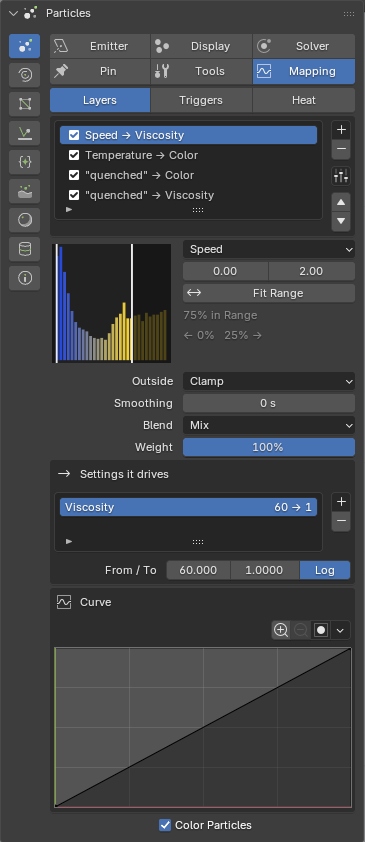
Mapping Layers
A layer takes a source — something the particle knows about itself — reshapes it with a curve and writes it into a setting. Stack several, blend them by Multiply, Add, Min or Max, and a single emitter can behave like many materials at once.
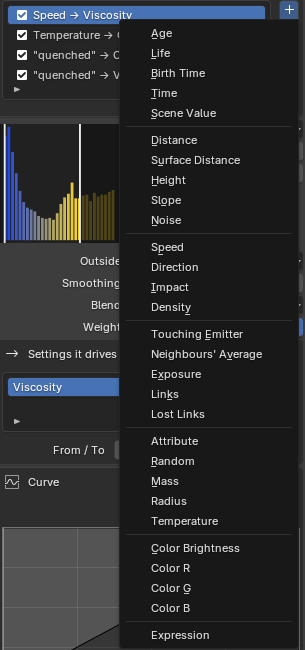
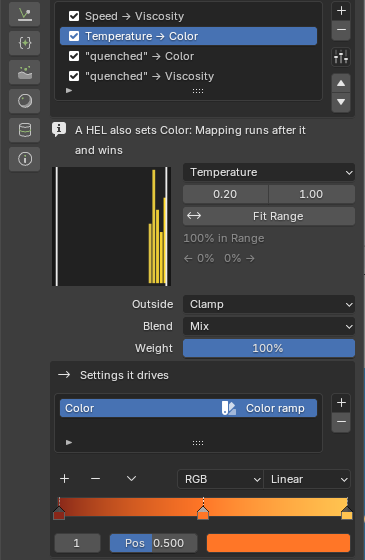
The Mapping panel: a stack of layers, each with its source, range and curve.Dozens of sources, each with a tooltip explaining what it measures.Color layers with a ramp of your own.
Sources: age, birth time, speed, direction, impact, height, slope, distance to a guide or a surface, noise, density, temperature, exposure, links, links lost, neighbours' average, touching emitter, scene value (an animated number or a baked sound), named attributes, random, and Expression to mix several in one formula.
Settings: viscosity, pressure, friction, radius, mass, air friction, attraction, colour — plus gravity, turbulence, a speed cap or a named attribute.
Smoothing makes a layer follow its source with a delay, so changes ease in instead of snapping.
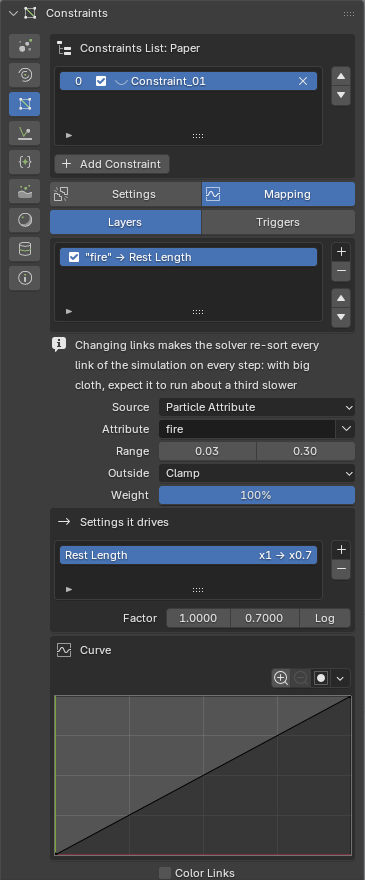
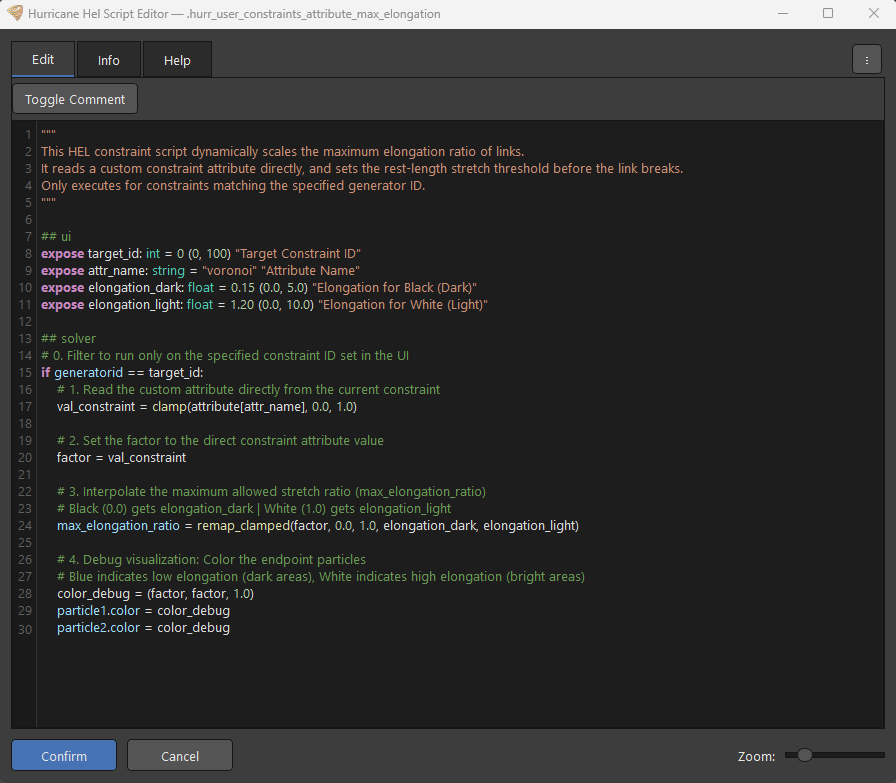
Constraint Mapping: the same system for links — stiffness, rest length, max elongation — reading strain, strain rate or how many links already broke nearby, so tears spread from a first break.
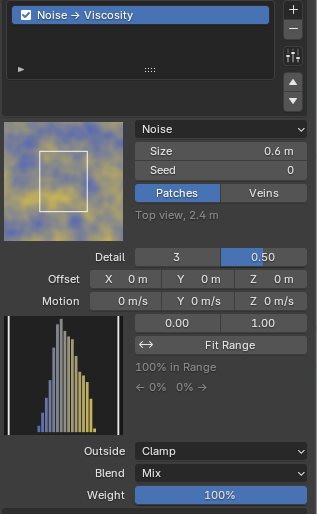
Procedural sources show a live preview of their pattern.Constraint Mapping: layers for links instead of particles.Presets for the most common setups.
New · Triggers
Triggers: When This, Do That
Where Mapping changes a setting gradually, a Trigger changes it at a moment: the instant a particle touches the floor, cools below a threshold or reaches a certain age, it freezes, sticks, dies, spawns new particles or moves to another emitter.
Conditions
Touching a collider or another emitter, inside a mesh, height, age, speed, impact, slope, temperature, distance, noise, attribute, scene value and Chance — each particle goes off at random a set number of times per second. Release At stops a condition near its limit from flickering.
Actions
Freeze, Kill, Spawn, Launch, Colour, Set a setting, Move to Emitter, Stick Together (sticky strings that stretch and break, or a block that hardens and moves as one), Paint Collider (wet, burnt, stained), Accumulate, Apply Force, Attach to a moving object, Pass Through colliders, Count and Event Points.
Timing
Once or continuous, Transition to fade a change in and out, Repeat to go off again every few seconds, and Delay. Displace by Paint lets what a trigger paints on a collider dent its surface, like clay.
Constraint Triggers
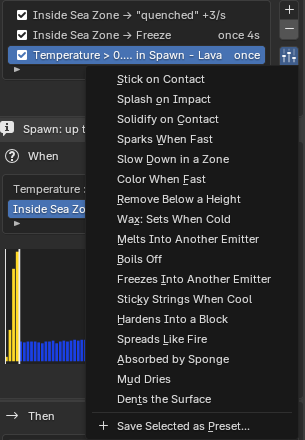
Links can break, switch off or change stiffness on a condition: Keeps Creases, Stays Dented, Falls Apart Over Time, Growing Hole and Tears in Weak Zones are one click away.
The Triggers panel: conditions above, actions below.Trigger presets for changes of state and classic effects.Spawn new particles into another emitter.
New · Heat
Heat: Melt, Cool, Set
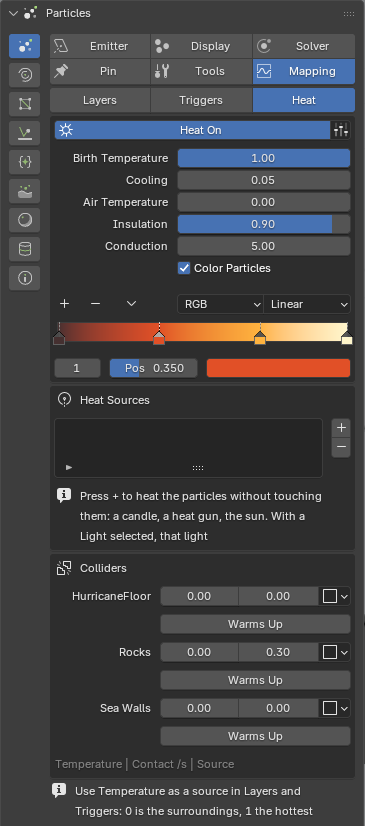
Every particle can carry a temperature. It passes between neighbours by conduction, to and from colliders by contact, cools into the air and rises near heat sources — and Mapping and Triggers read it to change viscosity, colour or state.
Presets for Wax, Lava and Butter: a cold block that melts where it touches something hot while its solid part sinks and slides as one piece.
Re-melt: hot particles warm the cold ones they touch, so hot wax melts set wax again and the melting spreads.
Heat colliders with a temperature from a value, a noise or an attribute, and colliders that Warm Up spot by spot with what touches them.
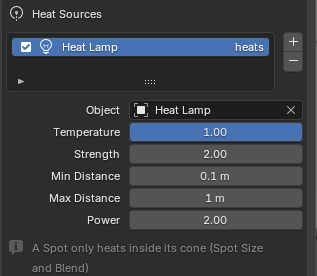
Heat Sources that heat without touching — an Empty or a Light; a Spot heats inside its cone — and an Air Temperature for the whole simulation.
Color Particles with your own ramp, to see the temperature in the viewport.
The Heat panel of an emitter.Heat colliders: temperature, contact and Warm Up.Heat Sources: Empties and Lights that heat at a distance.
New · Tools
Tools & Collider Maps
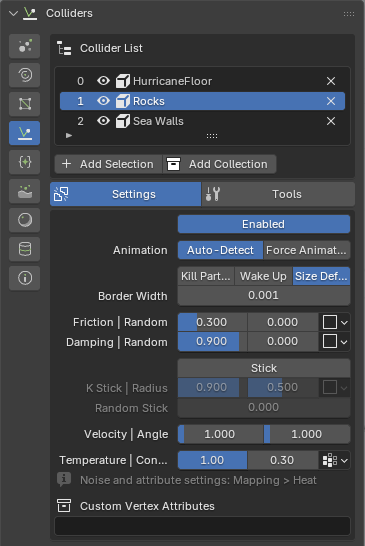
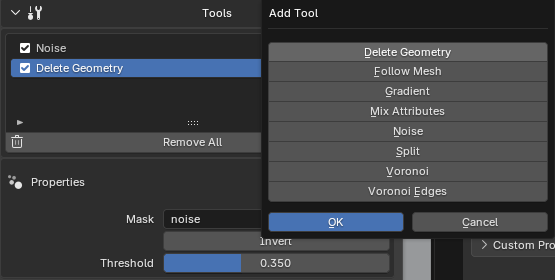
Tools write attributes onto emitters and colliders — a noise, a Voronoi pattern, a gradient, an image — that Mapping, Triggers, Heat and the collider maps can read. Friction, Damping and Stick stop being one number per collider.
The Tools: Noise, Voronoi, Voronoi Edges, Gradient, Image, Mix Attributes, Split, Delete Geometry and Follow Mesh, with a live preview of their pattern in the panel.
Image Tool: turns an image into an attribute from its brightness, with Threshold and Softness — for example, to write a word in friction or heat.
Tools stack: Mix Attributes, Split and Delete Geometry list the attributes written by the tools above them.
The collider maps can also read a noise pattern directly, with no extra vertices needed.
Contact maps on a collider: Friction, Damping and Stick from an attribute or a noise.Adding a Tool to an emitter or collider.
New · Cache
The Cache Module
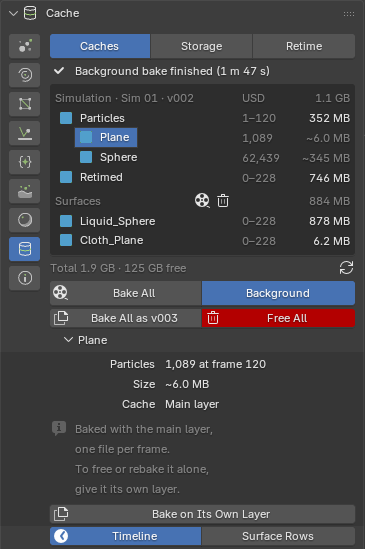
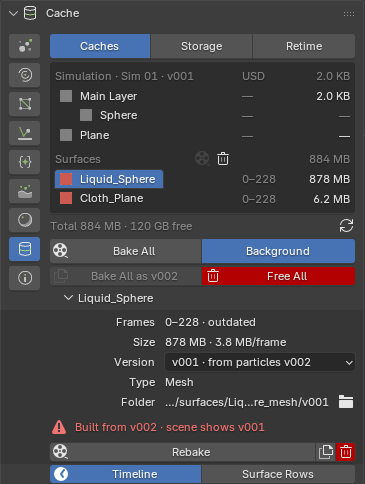
The simulation cache and the bakes of its meshes, Foam, Spray and Bubbles, in one list — with their frames, size and state, and a button to bake or free each one.
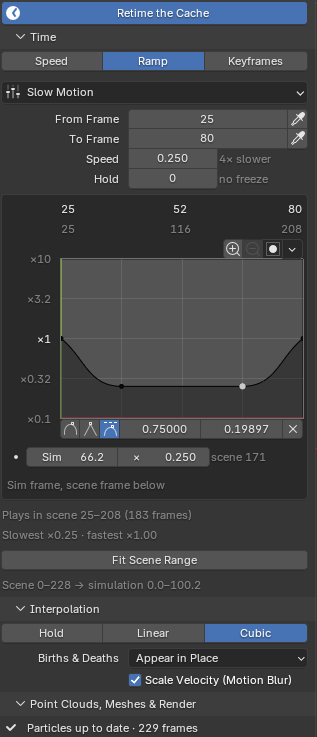
Every cache of the scene, with Bake All at the top.Cache layers: rebake one emitter without touching the rest.Retime with a Speed Ramp: slow motion over a chosen stretch.
Bake All & Background Bakes
One click bakes the simulation, then each mesh and its Foam, Spray and Bubbles, in order. Bakes can run in another Blender without a window so you keep working, with progress, time remaining, Pause, Resume and Cancel — and while paused, you can play what is already baked.
Versions
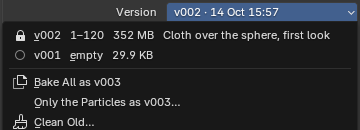
Bake into a new version to keep the current one, switch between versions without baking again, add a note, lock a version and clean old ones. Meshes remember which simulation version they came from, and the module shows which settings changed since the bake.
Retime
Play a finished simulation slower, faster or along an animated time curve without simulating again, with smooth in-between frames. Speed Ramp presets — Constant, Slow Motion, Hero, Bullet Time — and meshes, cloth and the render all follow.
Storage
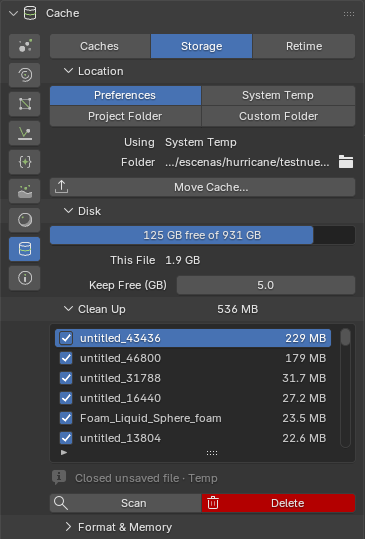
Choose where each file saves its caches and Move Cache to take them all elsewhere. Clean Up finds caches nobody uses, Keep Free stops a bake before the disk fills, and caches keep playing when moved to another folder or computer.
Storage: cache folder, free space and Clean Up.Mesh bakes that are older than the simulation are flagged.Switching between versions.
Core
Six Solvers, CPU or GPU
With DDR/PBD, each emitter picks the solver that suits its material and the unified core handles the collisions and forces between all of them. For large liquids, FLIP or APIC simulate every emitter on a grid, and MPM puts liquids, snow, sand, mud and jelly in one grid, each emitter with its own material. All of them run on the CPU or on the GPU.
DDR (Double Density Relaxation)▼
A double-density relaxation algorithm built for stable, realistic fluids.
PBD (Position Based Dynamics)▼
The industry standard for fast, stable soft bodies and deformable cloth.
PBD Multi-Step▼
Multi-step PBD for maximum stability and clean self-collisions in cloth.
FLIP▼
Grid liquid with PIC/FLIP transfer: lively, splashy water at large scale.
The classic for big pours, waves and splashes. Viscosity in physical units, surface tension, Thin Film, whitewater and GPU meshing all work with it.
APIC▼
Grid liquid with affine transfer: smooth, low-noise motion that keeps its swirls.
Keeps rotation and fine detail with less noise than FLIP, ideal for viscous liquids, calm pours and liquids that cling with Thin Film.
MPM Multi-MaterialNew▼
Material point method: liquids, snow, sand, mud, jelly, clay and pastes interacting in one simulation.
Each emitter has its own material, picked from 47 one-click presets in seven groups (Liquid, Viscous, Elastic, Chunky, Sandy, Plastic and Pastes, Crumbling): snow that packs and breaks into clumps, sand that piles and soaks, mud that tears, honey that flows, jelly that wobbles back. HEL scripts can change a particle's material as it goes, so jelly melts or water sets.
Scripting
HEL — Hurricane Expression Language
When presets and layers are not enough, write the behaviour yourself. HEL has a Python-like syntax and gives you per-particle control over velocities, positions, attributes and forces — the same kind of power as VEX in Houdini, injected into the solver in real time.
Built-in editor inside Blender that flags errors as you type, pointing at the exact line and the type of mistake.
Dozens of presets — vortices, attractors, wind and turbulence fields, wave generators, tearing activators — commented section by section and with guides in the viewport you can move and scale.
Exposed values become sliders in the panel, so a script can be reused like any other effect.
A complete HEL manual and an AI skill file you can give to any assistant to write new scripts for you.
The HEL editor and console, integrated in the Hurricane interface.
Cloth & Constraints
Cloth, Tearing & Six Constraint Types
High-fidelity cloth on the unified XPBD solver, with independent Stretch, Shear and dihedral Bending, tearing that reacts to forces, collisions and fluids, and garments built straight from sewing edges with Weld constraints.
Constraint
What it simulates
Cloth
Deformable cloth with Stretch, Shear and Bending from the mesh geometry, and ready presets from silk to denim.
Softbody
Volumetric, elastic bodies that keep their volume, built from proximity.
Rigidbody
Rigid structures with fixed internal stiffness, and Shape Matching for solid blocks.
Viscous
Mud, clay, chocolate or lava.
Plasticity
Materials that keep a permanent deformation after stress.
Weld
Physical seams between coincident vertices or loose edges — breakable for fractures.
Granular
Sand, Snow & Granular Effects
Sand, dirt, gravel and snow on a custom XPBD implementation with precise friction and collisions, and constraints that break dynamically under stress.
Sleep and WakeUp put resting particles to sleep to save time, and wake them the instant something hits them.
Fluids
Fluids, Foam, Bubbles & Spray
Fluids at any scale, with Foam, Spray and Bubbles generated from the simulation, fluids of different densities and viscosities mixed in one scene, and memory optimisations that handle millions of particles.
Roadmap
The Future of Hurricane
Development doesn't stop here. Our goal is to make Hurricane the definitive physics and fluid suite for Blender.
MPM Solver
The material point method for snow, mud, wet sand, jelly and structural destruction, on the same grid as FLIP and APIC.
Particle VFX Module
A module built on the Hurricane core for magical particle effects.
Community Presets
A growing library of official and community presets — HEL, Mapping, Triggers and emitters — to download and share in one click.
 HURRICANE
Version 0.9.9